
→ Ext.data.Model
The model describes some objects which will use in your application. If you are familiar with Java, then you should know about Bean/Pojo classes. This object is very similar to it, but in ExtJS..! So basically this object contains an array of fields.
→ Ext.data.Store
The store is client side storage (of records/data) of the model. We just have to provide a url for getting data to store using proxies as given in below example.
→ Ext.app.Controller
Controllers are the handlers/functions of events which will fire dynamically in your application. There are basically listeners of ExtJS components. For example click method of button, mouseover method of hyperlink.
Now I am giving here snaps of my code.
→ DemoController.js
→ DemoModel.js
→ DemoStore.js
→ DemoGrid.js
→ Viewport.js
→ init.js
→ Folder Strcture

The store is client side storage (of records/data) of the model. We just have to provide a url for getting data to store using proxies as given in below example.
→ Ext.app.Controller
Controllers are the handlers/functions of events which will fire dynamically in your application. There are basically listeners of ExtJS components. For example click method of button, mouseover method of hyperlink.
Now I am giving here snaps of my code.
→ DemoController.js
Ext.define('MyApp.controller.DemoController', {
 extend:'Ext.app.Controller',
 init:function() {
  /**
   * We will handle all events of components in init method of controller.
   * */
  this.control({
   /**
    * you can see usage control method over here.
    * http://docs.sencha.com/extjs/4.2.2/#!/api/Ext.app.Controller-method-control.
    **/
   'DemoGrid':{
    'itemclick':function(grid, record, item, index, e, eOpts){
     alert('You clicked row with index : '+index);
    }
   }
  });
 }
});
→ DemoModel.js
Ext.define('MyApp.model.DemoModel', {
 extend : 'Ext.data.Model',
 /**
  * Here there will be fields array.
  **/
 fields : [{
  name : 'name', //this property will indicate your data field property
  mapping : 'name' //this property will indicate dataIdex in grid.
 },{
  name : 'rollNo',
  mapping : 'rollNo'
 }]
});
→ DemoStore.js
Ext.define('MyApp.store.DemoStore', {
    extend: 'Ext.data.Store',
    model: 'MyApp.model.DemoModel',
    //it will load your store on start up automatically.
 autoLoad : true,
    proxy: {
        type: 'ajax',
        //url of your data. this may be from your server in your real application.
  url : 'data/demoData.json',
        reader: {
         //type of data..ExtJS also support xml format.
            type: 'json',
            root: 'data'
        }
    }
});
→ DemoGrid.js
Ext.define('MyApp.view.DemoGrid',{
 extend:'Ext.grid.Panel',
 alias:'widget.DemoGrid',
 initComponent:function()
 {
  this.store='MyApp.store.DemoStore';
  this.title='Hello World with ExtJS MVC';
  this.border=true;
  this.width=200;
  this.height=100;
  this.columns=[{
   text:'Name',
   dataIndex:'name',//this property will map with your model which used in store.
   flex:1
  },{
   text:'Roll No',
   dataIndex:'rollNo',
   flex:1
  }];
  this.callParent(arguments);
 }
});
→ Viewport.js
Ext.define('MyApp.view.Viewport', {
 extend : 'Ext.container.Viewport',
 requires : ['MyApp.view.DemoGrid'],
 initComponent:function(){

   this.items = [{
    xtype:'DemoGrid'
   }];

      this.callParent(arguments);
 }
});
→ init.js
Ext.application({
 name:'MyApp',
 appFolder:'com',
 autoCreateViewport : true,
 modals:['MyApp.model.DemoModel'],
 stores:['MyApp.store.DemoStore'],
 controllers:['DemoController'],
 launch : function(){
  alert('Your first application launched with ExtJS MVC..!');
        }
});
→ Folder Strcture

→ Download demo
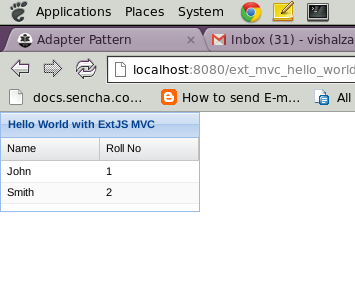
→ Snaps |
|
|

|


