Showing posts with label ExtJS. Show all posts

Tuesday, 31 December 2013

Layout Example with ExtJS MVC

       Here I am giving very simple but one step complex example compared to my last post hello world example. By reading/understanding this example you can learn real usage of layouts in ExtJS. I am trying to go one by one step for learning ExtJS. Please feel free to give any suggestions if you want to learn about ExtJS.

➟ About the Example

     I am giving brief explanation here about this example. Through this example, I want to provide some layout explanation (H-Box, V-Box, Border etc.) which are very popular and will frequently use in your Web Development. Along with this I also want to provide how to make server/remote call from ExtJS to fetch data. I used here Java-Servlet for fetching data but you can use do server/web-service call for this. I am listing some files in a simple grid which is coming from a server (here apache-tomcat). So here I am trying to integrate Java-EE with ExtJS UI.

➟ Pre-requirements

    To run this example successfully you need to manage these requirements.

     ➤ ExtJS library
  
         You can see about it here.

     Apache-tomcat
 
        You can see about it here.

    ➤ JSON Library for Java
 
        You can see about it here.


➟ Download demo

➟ Snaps

Thursday, 12 December 2013

Hello World with ExtJS MVC


In my last post we had seen first example with Ext JS, but now think a real senario of big application in which you have so many components, and there will be use multiple time as well. If we code in one page as we did in our last example in complex/big application, it is very hard to manage code. So ExtJS is providing MVC architecture for developing your application. Here I am giving a very small example in MVC with introduction. Before I go with the example I am trying to give some introduction about some ExtJS classes which are very necessary and important and frequently used while developing with ExtJS.

→ Ext.data.Model

    The model describes some objects which will use in your application. If you are familiar with Java, then you should know about Bean/Pojo classes. This object is very similar to it, but in ExtJS..! So basically this object contains an array of fields.

→ Ext.data.Store

   The store is client side storage (of records/data) of the model. We just have to provide a url for getting data to store using proxies as given in below example.

→ Ext.app.Controller

   Controllers are the handlers/functions of events which will fire dynamically in your application. There are basically listeners of ExtJS components. For example click method of button, mouseover method of hyperlink.

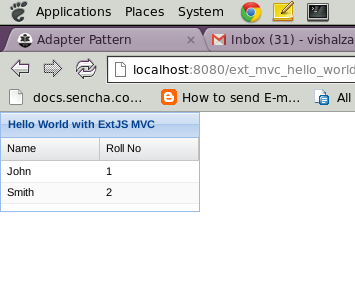
   Now I am giving here snaps of my code.

→ DemoController.js
Ext.define('MyApp.controller.DemoController', {
 extend:'Ext.app.Controller',
 init:function() {
  /**
   * We will handle all events of components in init method of controller.
   * */ 
  this.control({
   /**
    * you can see usage control method over here.
    * http://docs.sencha.com/extjs/4.2.2/#!/api/Ext.app.Controller-method-control.
    **/ 
   'DemoGrid':{
    'itemclick':function(grid, record, item, index, e, eOpts){
     alert('You clicked row with index : '+index);
    }
   }
  });
 }
});

→ DemoModel.js
Ext.define('MyApp.model.DemoModel', {
 extend : 'Ext.data.Model',
 /**
  * Here there will be fields array. 
  **/
 fields : [{
  name : 'name', //this property will indicate your data field property   
  mapping : 'name' //this property will indicate dataIdex in grid.
 },{
  name : 'rollNo',
  mapping : 'rollNo'
 }]
});

→ DemoStore.js
Ext.define('MyApp.store.DemoStore', {
    extend: 'Ext.data.Store',
    model: 'MyApp.model.DemoModel',
    //it will load your store on start up automatically.
 autoLoad : true,
    proxy: {
        type: 'ajax',
        //url of your data. this may be from your server in your real application.
  url : 'data/demoData.json',
        reader: {
         //type of data..ExtJS also support xml format.
            type: 'json',
            root: 'data'
        }
    }
});

→ DemoGrid.js
Ext.define('MyApp.view.DemoGrid',{
 extend:'Ext.grid.Panel',
 alias:'widget.DemoGrid',
 initComponent:function()
 {
  this.store='MyApp.store.DemoStore';
  this.title='Hello World with ExtJS MVC';  
  this.border=true;
  this.width=200;
  this.height=100;
  this.columns=[{
   text:'Name',
   dataIndex:'name',//this property will map with your model which used in store.
   flex:1
  },{
   text:'Roll No',
   dataIndex:'rollNo',
   flex:1
  }];
  this.callParent(arguments);
 }
});

→ Viewport.js
Ext.define('MyApp.view.Viewport', {
 extend : 'Ext.container.Viewport',
 requires : ['MyApp.view.DemoGrid'],
 initComponent:function(){
      
   this.items = [{
    xtype:'DemoGrid'
   }];
   
      this.callParent(arguments);
 }
});

→ init.js
Ext.application({
 name:'MyApp',
 appFolder:'com',
 autoCreateViewport : true,
 modals:['MyApp.model.DemoModel'],
 stores:['MyApp.store.DemoStore'],
 controllers:['DemoController'], 
 launch : function(){
  alert('Your first application launched with ExtJS MVC..!'); 
        }
});

→ Folder Strcture


→ Download demo

→ Snaps


Friday, 22 November 2013

Hello world with ExtJS

    If you didn't download ExtJS library still, please read this. I am trying to give here a very small example in Ext JS. In this example there is one simple form with three fields. I am giving some important explanation about basic and necessary functions or objects of Ext JS.
Ext.onReady
   
    This is the same function like document.onload event in simple HTML. It will call once your html page is loaded. So if we are not following any MVC architecture while developing application using Ext JS, we have to write everything in this function, otherwise it may happen that in which div/body you are trying to render your Ext JS component, it's not rendered on the page.

→ Ext.create

    Whenever you will create a new object (already defined) of any Ext JS component, we will use this function. This function takes two parameters. 1. Full name of the component which you are trying to create as per given by sencha. 2. Parameters or configurations object.

    So now I am giving you my code snap as given below. I hope this will useful for Ext beginner..!!


 Hello World


→ Download demo, Live example


→ Snaps

Hello World with Ext JS

Wednesday, 20 November 2013

Why Ext JS? What Ext JS? How Ext JS?


1. Why ExtJS?

     
      I will explain here in short why should we use Ext JS in your web application.


→ No Need to Worry about HTML Code

     While developing Web Application with ExtJS you do not worry about HTML tags. You can develop a whole application without knowledge of single <form> tag. Of course if you are aware of html tags, it's better for customize components in ExtJS. We will see later how to customize components in ExtJS.


→ Scalability - Code Reuse

   If you are developing big or small application Code re-usability will always take much less efforts in developing. ExtJS is supporting it in a very structured way and also easily from learning point of view.    


→ Very easy to Customize 

  ExtJS is giving very logically file separation and folder structure according to what is the purpose of that file/folder. So we can easily find a particular file for particular component and customize that.

→ Benefit of HTML5 Without know What is it

   You can develop your whole web application by taking all benefits of HTML5 without knowing any attributes of any components in HTML5, because ExtJS 4 internally use and support HTML5.

→ MVC Architecture 

    MVC (model, view, controller) is most widely used Architecture in Web Development at server side as well as client side. So we are talking about here is client side. ExtJS supports MVC architecture in client side development, so it's very easy to maintain your code while developing large applications. We will see shortly in next posts how to setup and start your application with ExtJS MVC.

→ Multiple platforms with No plugin

    This is a very big benefit of ExtJS that it is platform independent for run application. That means no browser plugins need to be installed. You can run your web application on android as well iPhone.

→ Thousands of Ready components

   There are lots of ready components and layout examples available in Sencha docs which we can use directly and also well documented each of them. We will see how to use it.

→ Very good Chart Library

   This is my personal experience that "to integrate charts" in a web application is sometimes headache or confusion that which library to use for that. ExtJS provides us very good and rich charting library purely in JS (JavaScript), so there is no dependency of flash and it will display in any device running on android or Ios. And also as we discussed before in customization topic charts is also very customizable.

→ Maximum utilization of Browser memory

   Every browser provides some local storage memory for saving your current web page data. You can test it here. In simple application (without using any framework) most of the developers are not utilizing that memory, actually we can reuse data which loaded once. ExtJS supports "Store" mechanism for this. We will see how can we achieve this by using ExtJS.

→ Browser Compatibility 

    Ext JS 4 supports all major web browsers, from Internet Explorer 6 to the latest version of Google Chrome. During development, however, we recommend that you choose one of the following browsers for the best debugging experience:

   > Google Chrome 10+
   > Apple Safari 5+
   > Mozilla Firefox 4+ with the Firebug Web Development Plugin


→ Easy to Learn

   There is very good documentation given here and of course I am trying to provide my best here regarding ExtJS..! So it's very easy to use in your web applications.

→ Rapid Development

  By using ready ExtJS components your development process will be very fast.

→ Large Community

   You will get a large number of users who will help you, so take a look here and start to learn and enjoy..!

→ Ready Plugins

   You will get numbers of ready plugins in ExtJS. I am giving you one example here. But we will see how to make our own plugins shortly. 


2. What ExtJS?

      
     ExtJS is a pure JavaScript framework to develop your web applications by taking advantages of DOM scripting, Ajax call, DHTML and many Util functions provided by it. ExtJS can integrate with any backend technology or framework or language like Java, PHP. I will see integration with Java.


3. How ExtJS?

     Before you start developing with ExtJS you have to download library form here. There is a community version available over there. After download just start Hello World with ExtJS and enjoy..!