Friday, 3 July 2015

Error messages related to Memory Exhausted ( Garbage Collector ) in Java

➟ Purpose

      The main purpose of this article is to understand the root cause behind different kind of error messages we generally face while our day to day coding life. Here, I am going to clear some important and most seen error messages.

➟ Class Hierarchy for Error

➟ Some Examples

➤ java.lang.OutOfMemoryError: GC Overhead limit exceeded

• It does not indicate that heap space memory is 100% full, but it's very small.
• If more than 98% of the total time is spent in garbage collection and less than 2% of the heap is recovered, then this kind of error is thrown.
• This feature is designed to prevent applications from running for an extended period of time while making little or no progress because the heap is too small.
• It can be disable using -XX:-UseGCOverheadLimit

➤ java.lang.OutOfMemoryError: Requested array size exceeds VM limit

• The application (or APIs used by that application) attempted to allocate an array that is larger than the heap size.
• For example, if an application attempts to allocate an array of 512 MB but the maximum heap size is 256 MB.

➤ java.lang.OutOfMemoryError: Java heap space

• Heap space memory is 100% full or it is less than required for allocating to new object.
• This error does not necessarily always imply a memory leak, but it can be.
• The problem can be as simple as a configuration issue, where the specified heap size (or the default size, if it is not specified) is insufficient for the application.

➤ java.lang.OutOfMemoryError: PermGen space

• It indicates the perm gen memory (subpart of heap) is full.
• It indicates it's not able to store more class or method metadata.

• It will be no more thrown while using JDK 8.

➤ java.lang.OutOfMemoryError: Metaspace

• It indicates the native memory (referred to here as metaspace) is full.
• It indicates it's not able to store more class or method metadata.
• It can be thrown while using JDK 8.

➤ java.lang.StackOverflowError

• It indicates the perm gen memory (subpart of heap) is full.
• It indicates it's not able to store more class or method metadata.

How String matters to Garbage Collection and Memory Leak in Java?

➟ What is Memory Leak?

      The application is unintentionally holding references to objects, and this prevents the objects from being garbage collected. This is the Java language equivalent of a memory leak.

➟ What is String Pool?

      String pool (String intern pool) is a special storage area in Java heap. When a string is created and if the string already exists in the pool, the reference of the existing string will be returned, instead of creating a new object and returning its reference.

➤ Some Examples

• Both below are same. It will create new instance only if it is not available in pool, and then add in pool.
String s1 = "Vishal"; 
String s2 = new String("Vishal").intern();

• Below line will create new instance each time.
String s3 = new String("Vishal");

➟ String.substring Method

➤ Before JDK 7 update 6

• String was using counter, offset variable for managing the operations like Substring.
• String was sharing same char[] of original String while calling substring method, thus original String was not eligible for GC.
• Substring method was fast compare to new version.

➤ After JDK 7 update 6

• Counter and offset variables has been removed from String class.
• String is not sharing char[] of original String while calling substring method.
• Substring method is slow compare to old version, because it will create new char[] for each call of substring.

➟ Changes done for String.substring method update in JDK 7u6

➟ Memory Leak Bug Example in before JDK 7u6 (Source)

public class TestGC {
    private String largeString = new String(new byte[100000]);
    
    String getSmallString() {
// if caller stores this substring, this object will not be gc'ed
        return this.largeString.substring(0,2);
//      return new String(this.largeString.substring(0,2)); // no error here!
    }
    
    public static void main(String[] args) {
        java.util.ArrayList list = new java.util.ArrayList();
        for (int i = 0; i < 1000000; i++) {
            TestGC gc = new TestGC();
            list.add(gc.getSmallString());
        }
    }
}
➟ Java 8 Update

➤ String Deduplication :

• A new optimization has been made that enables the G1 collector to identify strings which are duplicated more than once across your heap.
• It will handle it by pointing into the same internal char[] array.
• It will avoid multiple copies of the same string from residing inefficiently within the heap.

Garbage Collector in Java

     
Garbage Collector is very vast topic, but I am going to cover only here what every Java Developer must know.

➟ What is Garbage Collection?

• Garbage Collection is a process in java which is carried by a daemon thread called “Garbage Collector (GC).”
• Garbage Collector will call finalize method of object before removing it from memory. Thus it will allow us to enable clean up processing.
• We can't force Garbage Collector to run it at the moment, but we can just request it using System.gc() or Runtime.gc().
• Garbage collector types are defined based on how it works rather than which type of memory it collects.
• All types of collectors can collect the all the types of memory.
• There are four types of garbage collectors available in JVM, each of them have its own unique advantages and disadvantages. The choice of which one to use isn’t automatic and lies on your shoulders and the it depends on differences in throughput and application pauses.

➟ Types of Garbage Collectors

1. The Serial Collector

• Designed for single-threaded environments (e.g. 32 bit or Windows) and for small heaps.
• It freezes all application threads whenever it’s working. (Application Pauses)
• It uses just a single thread for garbage collection.
• Almost outdated now.

2. The Parallel/Throughput Collector

• Designed for multi-threaded environments.
• It also freezes all application threads whenever it’s working. (Application Pauses)
• Uses multiple threads for garbage collection.
• It is the JVM’s default collector.

3. The CMS(Concurrent Mark Sweep) Garbage Collector

• Designed for multi-threaded environments.
• It will freezes all application threads, in two scenarios only.
  ➤ While marking the referenced objects in the tenured/old generation space
  ➤ If there is a change in heap memory in parallel while doing the garbage collection.
• It uses multiple threads (“concurrent”) to scan through the heap (“mark”) for unused objects that can be recycled (“sweep”).
• It ensure better application throughput.
• It's not by default Collector used by JVM.
• It uses more CPU in compare to the Parallel Collector.
• Race condition occurs between collecting the young and old generations.
• If you are willing to allocate more CPU resources (multicore processors) to avoid application pauses this is the collector you’ll probably want to use.
• It's suitable when your heap is less than 4Gb in size.

4. The G1 (Garbage First) collector

• The Garbage first collector (G1) introduced in JDK 7 update 4.
• The collector splits the heap up into fixed-size regions and tracks the live data in those regions (spanning from 1MB to 32MB (depending on the size of your heap)).
• The G1 collector utilizes multiple background threads to scan through the heap (which divided into regions).
• When a GC is deemed necessary, it collects the regions with less live data first (hence, "garbage first").
• It's suitable when your heap is greater than 4Gb in size.

➟How to apply?

• Serial generational collector ➤ -XX:+UseSerialGC
• Parallel for young space, Serial for old space generational collector ➤ -XX:+UseParallelGC
• Parallel for young and old both spaces generational collector ➤ -XX:+UseParallelOldGC
• Concurrent mark sweep with serial young space collector ➤ -XX:+UseConcMarkSweepGC –XX:-UseParNewGC
• Concurrent mark sweep with parallel young space collector ➤ -XX:+UseConcMarkSweepGC –XX:+UseParNewGC
• G1 garbage collector ➤ -XX:+UseG1GC

Wednesday, 1 July 2015

Heap vs Stack Memory Java

Stack Memory Heap Memory
What? It's type of temporary memory used by JVM to store local method primitives variables, and method calls information. It's type of memory used by JVM to store references of objects (regardless where they are created) and String Pool.
Size? Small, It's very less compare to Heap. Big, It's very more compare to Heap.
Scope? Single Thread Multiple Threads
Shared? No, It is not shared between multiple threads. Each thread will have it's own stack memory. Yes, It is shared between multiple threads, so each thread can get reference of any object.
Example? Infinite Recursion :
public static void test(long a,long b){
   test(a++,b++);
}
Adding Infinite String in List/Set.
public static void test(){
      List list = new ArrayList();
      while(true){
          list.add(new String("Test"));
      }
}
Notification of Exceed Memory JVM will throw StackOverflowError JVM will throw OutOfMemoryError
Access Spped? Fast, Single thread will access it, so obviously it can be access more faster compare to Heap. Slow, Multiple thread will access it, so obviously it can be access slower compare to Stack.
How to Apply? JVM Option -Xss=10M, It's vary from version to version. by default 128KB for windows 64 bit. Oracle Docs JVM Option -Xms=512M (Initial Java heap size) and -Xmx=1024M (Maximum Java heap size)
How to Avoid? Try to avoid recursive code as much as possible. Recursion code can be always tranform into Interative.

Why? : Recursion vs Iteration
How? : Binary Search Alorithm
Make sure that any objects have not live/strong references behind your eyes which leads to Memory Leak.

Avoid open Streams, close them. (mostly with IO)
Avoid open connections, close them. (mostly with database operations)
Avoid new String(String s), alternative use new String().intern()
Garbage collected? No, Once a function call runs to completion, any data on the stack created specifically for that function call will automatically be deleted. Yes, Once all references for any object are null, it will be collected by GC which is run by JVM.
Common Points? Stack and Heap both are stored in the computer's RAM.

Wednesday, 10 September 2014

Lucene Indexing and Searching with MySQL data

        While working with my recent project I need to work with Lucene indexing. I tried Google, but I was not able to find any example with Lucene API latest version (i.e. 4.10.0). So here I am giving very simple example for indexing and then searching the particular data using Lucene API.

➟ About the Example

     I am giving brief explanation here about this example. This example will retrieve some information from database using simple JDBC connection. After that it will index that data and we can search indexed data very fast using Lucene API.

➟ Pre-requirements

    To run this example successfully you need to manage these requirements.

     ➤ Any SQL Database
  
         You can any driver name according to database. I have used MySQL for this example. Create one database named solr_test and one table named student_details with fields id INT, name varchar(10), address varchar(50) and details varchar(500).

    ➤ Maven
 
        You can see about it This is maven based project. So to run it successfully you need to configure any Java IDE with maven plugin or maven must installed externally


➟ Download demo

➟ Code Snap

LceneTest.java.js


package com.lucene.test;

import java.io.File;
import java.sql.Connection;
import java.sql.DriverManager;
import java.sql.ResultSet;
import java.sql.Statement;

import org.apache.lucene.analysis.Analyzer;
import org.apache.lucene.analysis.core.KeywordAnalyzer;
import org.apache.lucene.document.Document;
import org.apache.lucene.document.Field;
import org.apache.lucene.document.FieldType;
import org.apache.lucene.document.IntField;
import org.apache.lucene.document.StringField;
import org.apache.lucene.index.DirectoryReader;
import org.apache.lucene.index.IndexReader;
import org.apache.lucene.index.IndexWriter;
import org.apache.lucene.index.IndexWriterConfig;
import org.apache.lucene.index.IndexWriterConfig.OpenMode;
import org.apache.lucene.queryparser.classic.MultiFieldQueryParser;
import org.apache.lucene.search.IndexSearcher;
import org.apache.lucene.search.Query;
import org.apache.lucene.search.TopDocs;
import org.apache.lucene.store.Directory;
import org.apache.lucene.store.FSDirectory;
import org.apache.lucene.util.Version;

/**
 * This is test example file to explore Lucene API
 * 
 * @author vishal.zanzrukia
 * @version 1.0
 */
public class LuceneTest
{
 /**
  * this is index directory path where all index file will be stored which lucene uses internally.
  */
 public static final File INDEX_DIRECTORY = new File("IndexDirectory");

 /**
  * to create index on simple database table
  */
 public void createIndex()
 {

  System.out.println("-- Indexing --");

  try
  {
   /** JDBC Section */
   Class.forName("com.mysql.jdbc.Driver").newInstance();

   /** Assuming database solr_test exists */
   Connection conn = DriverManager.getConnection("jdbc:mysql://localhost:3306/solr_test", "root", "P@ssw0rd@123");
   Statement stmt = conn.createStatement();
   String sql = "select id,name,address,details from student_details";
   ResultSet rs = stmt.executeQuery(sql);

   /** Lucene Section */
   Directory directory = FSDirectory.open(INDEX_DIRECTORY);

   /** defining Analyzer */
   Analyzer keywordAnalyzer = new KeywordAnalyzer();

   /** preparing config for indexWriter */
   IndexWriterConfig writerConfig = new IndexWriterConfig(Version.LATEST, keywordAnalyzer);
   /** Create a new index in the directory, removing any previously indexed documents */
   writerConfig.setOpenMode(OpenMode.CREATE);
   /**
    * Optional: for better indexing performance, if you are indexing many documents,
* increase the RAM buffer. But if you do this, increase the max heap size to the JVM (eg add -Xmx512m or -Xmx1g): */ // writerConfig.setRAMBufferSizeMB(256.0); IndexWriter iWriter = new IndexWriter(directory, writerConfig); int count = 0; Document doc = null; Field field = null; /** declaring string type */ FieldType stringType = new FieldType(); stringType.setTokenized(true); stringType.setIndexed(true); /** Looping through resultset and adding data to index file */ while (rs.next()) { doc = new Document(); /** adding id in document */ field = new IntField("id", rs.getInt("id"), Field.Store.YES); doc.add(field); /** adding name in document */ field = new StringField("name", rs.getString("name"), Field.Store.YES); doc.add(field); /** adding address in document */ field = new StringField("address", rs.getString("address"), Field.Store.YES); doc.add(field); /** adding details in document */ field = new StringField("details", rs.getString("details"), Field.Store.YES); doc.add(field); /** Adding doc to iWriter */ iWriter.addDocument(doc); count++; } System.out.println(count + " record indexed"); /** Closing iWriter */ iWriter.commit(); iWriter.close(); /** Closing JDBC connection */ rs.close(); stmt.close(); conn.close(); } catch (Exception e) { e.printStackTrace(); } } /** * to search the keywords * * @param keyword */ public void search(String keyword) { System.out.println("-- Seaching --"); try { /** Searching */ IndexReader directoryReader = DirectoryReader.open(FSDirectory.open(INDEX_DIRECTORY)); IndexSearcher searcher = new IndexSearcher(directoryReader); Analyzer keywordAnalyzer = new KeywordAnalyzer(); /** MultiFieldQueryParser is used to search multiple fields */ String[] filesToSearch = { "id", "name", "address", "details" }; MultiFieldQueryParser mqp = new MultiFieldQueryParser(filesToSearch, keywordAnalyzer); /** search the given keyword */ Query query = mqp.parse(keyword); System.out.println("query >> " + query); /** run the query */ TopDocs hits = searcher.search(query, 100); System.out.println("Results found >> " + hits.totalHits); Document doc = null; for (int i = 0; i < hits.totalHits; i++) { /** get the next document */ doc = searcher.doc(hits.scoreDocs[i].doc); System.out.println("==========" + (i + 1) + " : Start Record=========\nId :: " + doc.get("id") + "\nName :: " + doc.get("name") + "\nDetails :: " + doc.get("details") + "\n==========End Record=========\n"); } } catch (Exception e) { e.printStackTrace(); } } /** * main method to check the output * * @param args */ public static void main(String[] args) { LuceneTest obj = new LuceneTest(); /** creating index */ obj.createIndex(); /** searching simple keyword */ System.out.println("==================searching simple keyword==========================="); obj.search("vishal"); /** searching using wild card */ System.out.println("==================searching using wild card==========================="); obj.search("neh*"); /** searching using logical OR operator */ System.out.println("==================searching using logical OR operator==========================="); obj.search("vishal OR neha"); /** searching using logical AND operator */ System.out.println("==================searching using logical AND operator==========================="); obj.search("vishal AND neha"); } }

Tuesday, 31 December 2013

Layout Example with ExtJS MVC

       Here I am giving very simple but one step complex example compared to my last post hello world example. By reading/understanding this example you can learn real usage of layouts in ExtJS. I am trying to go one by one step for learning ExtJS. Please feel free to give any suggestions if you want to learn about ExtJS.

➟ About the Example

     I am giving brief explanation here about this example. Through this example, I want to provide some layout explanation (H-Box, V-Box, Border etc.) which are very popular and will frequently use in your Web Development. Along with this I also want to provide how to make server/remote call from ExtJS to fetch data. I used here Java-Servlet for fetching data but you can use do server/web-service call for this. I am listing some files in a simple grid which is coming from a server (here apache-tomcat). So here I am trying to integrate Java-EE with ExtJS UI.

➟ Pre-requirements

    To run this example successfully you need to manage these requirements.

     ➤ ExtJS library
  
         You can see about it here.

    ➤ Apache-tomcat
 
        You can see about it here.

    ➤ JSON Library for Java
 
        You can see about it here.


➟ Download demo

➟ Snaps

Thursday, 12 December 2013

Hello World with ExtJS MVC


In my last post we had seen first example with Ext JS, but now think a real senario of big application in which you have so many components, and there will be use multiple time as well. If we code in one page as we did in our last example in complex/big application, it is very hard to manage code. So ExtJS is providing MVC architecture for developing your application. Here I am giving a very small example in MVC with introduction. Before I go with the example I am trying to give some introduction about some ExtJS classes which are very necessary and important and frequently used while developing with ExtJS.

→ Ext.data.Model

    The model describes some objects which will use in your application. If you are familiar with Java, then you should know about Bean/Pojo classes. This object is very similar to it, but in ExtJS..! So basically this object contains an array of fields.

→ Ext.data.Store

   The store is client side storage (of records/data) of the model. We just have to provide a url for getting data to store using proxies as given in below example.

→ Ext.app.Controller

   Controllers are the handlers/functions of events which will fire dynamically in your application. There are basically listeners of ExtJS components. For example click method of button, mouseover method of hyperlink.

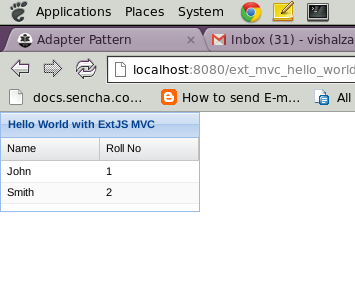
   Now I am giving here snaps of my code.

→ DemoController.js
Ext.define('MyApp.controller.DemoController', {
 extend:'Ext.app.Controller',
 init:function() {
  /**
   * We will handle all events of components in init method of controller.
   * */ 
  this.control({
   /**
    * you can see usage control method over here.
    * http://docs.sencha.com/extjs/4.2.2/#!/api/Ext.app.Controller-method-control.
    **/ 
   'DemoGrid':{
    'itemclick':function(grid, record, item, index, e, eOpts){
     alert('You clicked row with index : '+index);
    }
   }
  });
 }
});

→ DemoModel.js
Ext.define('MyApp.model.DemoModel', {
 extend : 'Ext.data.Model',
 /**
  * Here there will be fields array. 
  **/
 fields : [{
  name : 'name', //this property will indicate your data field property   
  mapping : 'name' //this property will indicate dataIdex in grid.
 },{
  name : 'rollNo',
  mapping : 'rollNo'
 }]
});

→ DemoStore.js
Ext.define('MyApp.store.DemoStore', {
    extend: 'Ext.data.Store',
    model: 'MyApp.model.DemoModel',
    //it will load your store on start up automatically.
 autoLoad : true,
    proxy: {
        type: 'ajax',
        //url of your data. this may be from your server in your real application.
  url : 'data/demoData.json',
        reader: {
         //type of data..ExtJS also support xml format.
            type: 'json',
            root: 'data'
        }
    }
});

→ DemoGrid.js
Ext.define('MyApp.view.DemoGrid',{
 extend:'Ext.grid.Panel',
 alias:'widget.DemoGrid',
 initComponent:function()
 {
  this.store='MyApp.store.DemoStore';
  this.title='Hello World with ExtJS MVC';  
  this.border=true;
  this.width=200;
  this.height=100;
  this.columns=[{
   text:'Name',
   dataIndex:'name',//this property will map with your model which used in store.
   flex:1
  },{
   text:'Roll No',
   dataIndex:'rollNo',
   flex:1
  }];
  this.callParent(arguments);
 }
});

→ Viewport.js
Ext.define('MyApp.view.Viewport', {
 extend : 'Ext.container.Viewport',
 requires : ['MyApp.view.DemoGrid'],
 initComponent:function(){
      
   this.items = [{
    xtype:'DemoGrid'
   }];
   
      this.callParent(arguments);
 }
});

→ init.js
Ext.application({
 name:'MyApp',
 appFolder:'com',
 autoCreateViewport : true,
 modals:['MyApp.model.DemoModel'],
 stores:['MyApp.store.DemoStore'],
 controllers:['DemoController'], 
 launch : function(){
  alert('Your first application launched with ExtJS MVC..!'); 
        }
});

→ Folder Strcture


→ Download demo

→ Snaps